In 2025, as BIM workflows become ever more sophisticated, the process of Revit family creation demands not only modelling skill but strategic clarity, data discipline, and performance awareness. A Revit family is more than geometry—it’s a reusable asset that must perform reliably, integrate seamlessly, and scale across projects. Miss these elements, and you risk model bloat, coordination delays, and reduced ROI.
If you’re preparing to create or refine your Revit family library, here are five major points to consider—each updated with the latest data, insights, and best practices for modern BIM adoption.
1. Define Purpose, Functionality & Reuse Intent
Before you launch into Revit family creation, ask these foundational questions: Who will use this family? (architects, engineers, fabricators, contractors?) Where will it be used? (single project vs. library-reuse?) What parameters and behaviours will it need?
Knowing the purpose upfront helps avoid unnecessary complexity. For example, a family created only for a one-off design instance may not need the same breadth of parameters or rigour as a reusable manufacturer family. Industry research emphasises that defining purpose early greatly improves reusability and reduces model inefficiencies.
When you clearly define the intended use, you can:
- Select the correct family type (system, loadable, or in-place).
- Decide on the level of detail (LOD) appropriate for the family’s usage phase.
- Avoid modelling features, geometry or parameters that offer no value, thereby keeping the family lean.
- Support consistent metadata and naming from the start, which helps downstream scheduling, tagging, and coordination.
2. Select the Right Template & Standardised Framework
The template you choose for your Revit family matters. A discipline-specific template (architectural, structural, MEP) offers built-in settings, categories, subcategories, visibility filters and pre-configured parameters that align with project standards. Industry commentary emphasises that starting from the right family template reduces errors and increases efficiency.
Best practices include:
- Use a “Generic Model – Face Based” or similar when you need maximum flexibility, but switch to dedicated templates when you know the category.
- Ensure your family template supports the naming and parameter conventions your firm uses — this means fewer misloads and fewer model issues.
- Align your family creation template to your central library or firm standard, so families fit seamlessly into your model environment.
- Create or maintain a central library of approved templates, with version control and documentation—this supports consistency across projects.
3. Parameterisation & Constraints: The Heart of Revit Family Creation
When you build your family, the way you define parameters and constraints will determine how usable, flexible, and performance-efficient the family is. Poor parameter structure leads to confused users, unmanageable types, and reduced performance.
Key rules for parameterisation:
- Decide early: Type parameters control properties shared across all instances of a type (e.g., width, height), while Instance parameters allow variation per placed instance (e.g., colour). Getting this right prevents unwanted family duplicates.
- Limit the number of parameters to what is truly required. Too many parameters may degrade performance.
- Use shared parameters when you expect family data to appear in schedules, tags, or across linked files.
- Apply constraints and reference planes to lock geometry so the family behaves predictably.
- Use consistent naming conventions and clear grouping in the family parameter dialog—this improves usability and maintainability. For example: “ARCH_Door_Type” vs “Door_Type1”. Research shows that parameter discipline supports better model reuse and fewer errors.
By investing time upfront in a clean parameter system, you avoid chaos downstream and support your BIM workflows in production.
4. Geometry, Level of Detail & Performance Optimization
In Revit family creation, balancing detail and performance is one of the toughest challenges—especially in multi-discipline BIM projects. Too little detail and the family lacks usability; too much and the model slows, becomes heavy, and risks dysfunction.
Here are modern‐era guidelines:
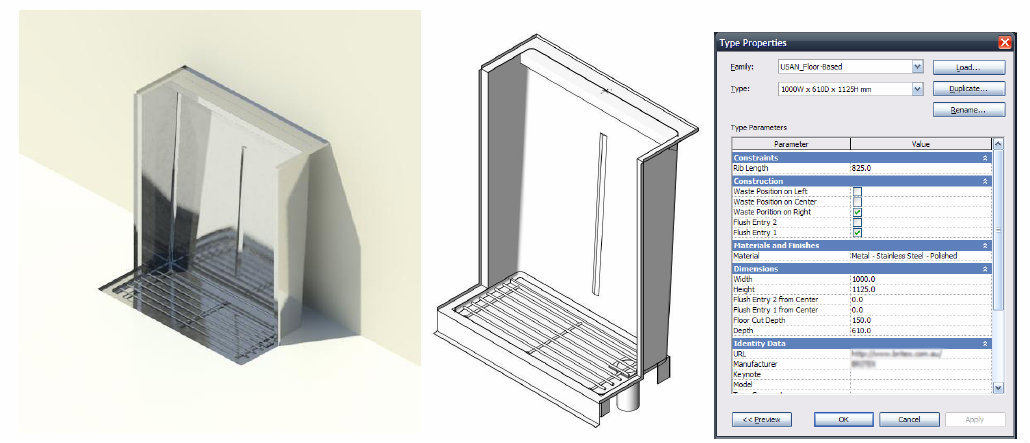
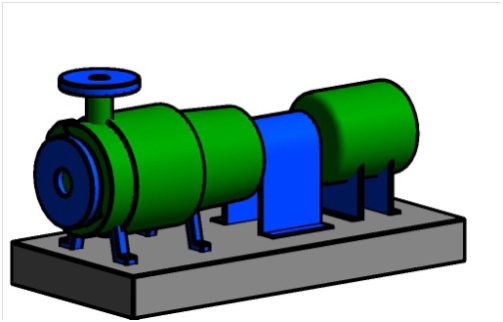
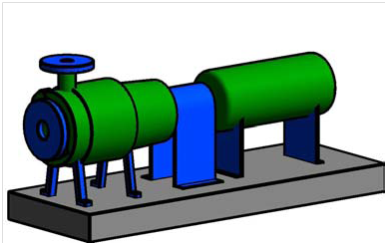
- Model only what is visible or meaningful at the required stage (LOD). If a drawer inside a table cannot be seen or scheduled, you may model only its face. (This aligns with earlier recommendations from 2015 but is now reinforced by performance data.)
- Use simplified geometry for finer detail levels; for instance, use symbolic lines instead of full 3D geometry in non-3D views.
- Limit nested families and avoid deep nesting where possible. Excessive nesting complicates updates and increases file load. Many experts recommend limiting to no more than two levels of nesting.
- Audit family files—purge unused materials, remove redundant elements, limit bitmaps and image usage, and avoid importing CAD unless necessary. Autodesk’s best practices emphasise lightweight families for faster model performance.
- Test the family in projects: create a new project, load the family, ensure it behaves, schedules properly, and does not slow the model.
Recent industry data show that firms using standardized families report up to 25-30% file size reductions and up to 40% faster coordination times compared to ad-hoc modelling. This underscores why performance matters.
5. Naming, Library Management & Lifecycle Governance
Creating a family is not just about one project—it’s about lifecycle value, reuse, and library governance. Too many firms create one-off families that later cause confusion, version mismatch, bloated libraries, and inconsistent BIM workflows.
To avoid that, consider:
- Naming conventions: Use a prefix/suffix strategy—e.g., “STR_Column_Hollow_200x200” or “MEP_Fan_Ceiling_600x600”. Clear, consistent names reduce lookup time, errors, and duplication.
- Centralised library: Maintain a controlled repository of approved families, with version control, metadata, revision history, and documentation for each family. This supports reuse, reduces duplication, and ensures quality.
- Versioning and QA: Implement a family review process. Check parameters, geometry, naming, load behaviour, and compatibility with existing projects. As one study emphasised, “A high-quality Revit family performs perfectly within the model.”
- Lifecycle handover and reuse: Particularly important when families will be used across projects, facilities management, or exported to digital twins. Families must remain structured for future use.
- Clear documentation: Attach metadata or internal documentation to families—purpose, intended use, restrictions, parameters list. This increases user confidence and reduces misuse.
When firms adopt these governance practices, they not only save modelling time but support corporate BIM strategy—making Revit family creation not just a modelling task but a strategic asset-development process.
Putting It All Together: A Workflow Summary
Here’s a streamlined workflow to embed these five points into a robust process for Revit family creation:
- Define Purpose: Clarify who will use the family, in what context, and with what reuse intent.
- Template Selection: Choose the correct discipline template and align it with your library standards.
- Parameter & Constraint Setup: Establish essential parameters, constraints, and naming conventions before modelling geometry.
- Geometry & Performance Optimization: Build lightweight, efficient geometry, minimise nesting, check performance and test in project context.
- Naming & Library Governance: Finalise naming, document the family, store it in the library, apply version control and monitor lifecycle reuse.
By following this structured process, you align modelling tasks with strategic goals—ensuring your families add value, reduce rework, and enable true BIM-driven workflows.
Ready to elevate your Revit content creation process?
Download “Best Practices of Revit Family Creation – 2025 Edition” and get an in-depth look at the latest methodologies, automation techniques, and quality control standards shaping BIM workflows today. Whether you’re a BIM Manager, CAD Engineer, or Revit Content Creator, this guide will help you design smarter, faster, and more efficiently.


Leave a Reply