LOD 100, 200, 300, 350, 400, 500 – what they mean and how LOD in BIM helps avoid construction disasters
So, what’s the deal with LOD in BIM?
If you’ve ever found yourself lost in a conversation about BIM models and someone throws out “LOD 300” or “we’re delivering at LOD 400,” you’re not alone. It sounds technical—and well, it kind of is—but once you break it down, it’s pretty simple and essential.
LOD stands for Level of Development, and it’s just a way of describing how detailed and reliable your model elements are at different stages of a project. Think of it like zooming in on a map: at first, you only see the country borders (LOD 100), and by the end, you can see the streets, shops, and even what time the bakery opens (LOD 500).
At Revit Modeling India, we work with clients worldwide on infrastructure, commercial, and educational projects—and getting the LOD right has made a significant difference in avoiding rework, confusion, and cost overruns.
Let’s walk through what each level means, in plain English—with some real examples from our projects.
LOD 100 – The “Big Picture” Stage
At this level, you’re working with rough shapes. You know something will go in a certain spot—a wall, a column, an AC duct—but you’re not worrying about exact sizes or specs just yet.
- Used for: Feasibility studies, early design proposals
- Think of it like: A napkin sketch or a Lego block version of your building.
Real example: For an educational campus project in Mexico, we started at LOD 100 to map out the site and building zones. It helped stakeholders visualize what could go where—without overcommitting to design details too early.
LOD 200 – Getting Warmer
Now your model elements start to resemble what they are. A duct looks like a duct, and a wall has an approximate thickness. It’s still generic, but now you can start doing quantity take-offs and some early coordination.
- Used for: Schematic design, cost estimation, general planning
- Think of it like: A rough draft that’s good enough to show someone and get feedback.
Real example: In a UK commercial space renovation, we used LOD 200 models from point cloud data to recreate existing layouts. It gave the client something solid to plan against—without jumping into high-detail modeling yet.
LOD 300 – The Real Design Kicks In
At LOD 300, everything gets more serious. Model elements now have real dimensions, proper locations, and start looking exactly like what will be built. This is where coordination between teams starts to matter.
- Used for: Construction documents, detailed coordination
- Think of it like: The approved blueprint that contractors rely on.
Real example: When we worked with a global infrastructure provider, we modeled the MEP systems at LOD 300—right down to accurate pipe routing and duct layouts. This set the stage for seamless consultant reviews and construction-ready documents.
LOD 350 – Where Everything Meets
LOD 350 adds more than just detail—it shows how things connect. You’re not just modeling a duct now; you’re showing how it’s supported, connected, or braced. This helps different trades (HVAC, plumbing, electrical) coordinate their installations.
- Used for: Clash detection, trade coordination
- Think of it like: Showing how puzzle pieces lock together.
Real example: In the same infrastructure project, our team modeled plumbing and cable trays to LOD 350 so the MEP trades wouldn’t bump heads on-site. Literally.
LOD 400 – It’s Fabrication Time
This is where models turn into things you can build off directly. LOD 400 includes all the details needed for manufacturing or prefab—lengths, materials, connections, and tolerances.
- Used for: Shop drawings, prefabrication
- Think of it like: A model that talks directly to the fabricator.
Real example: In the UK commercial project, parts of the HVAC and plumbing systems were modeled at LOD 400 so the contractor could use them for prefab. It saved time on-site and reduced material waste.
LOD 500 – As-Built and Verified
Finally, LOD 500 represents what got built. It’s not a promise—it’s reality. Everything is field-verified and loaded with data: model geometry, equipment details, serial numbers, and everything a facilities team needs to operate and maintain the space.
- Used for: Facility management, digital twins
- Think of it like: A living, breathing model of the real thing.
Real example: After finishing the educational campus renovation in Mexico, we handed over LOD 500 as-builts—so their FM team had everything they needed, from room layouts to AC unit details, all in one place.
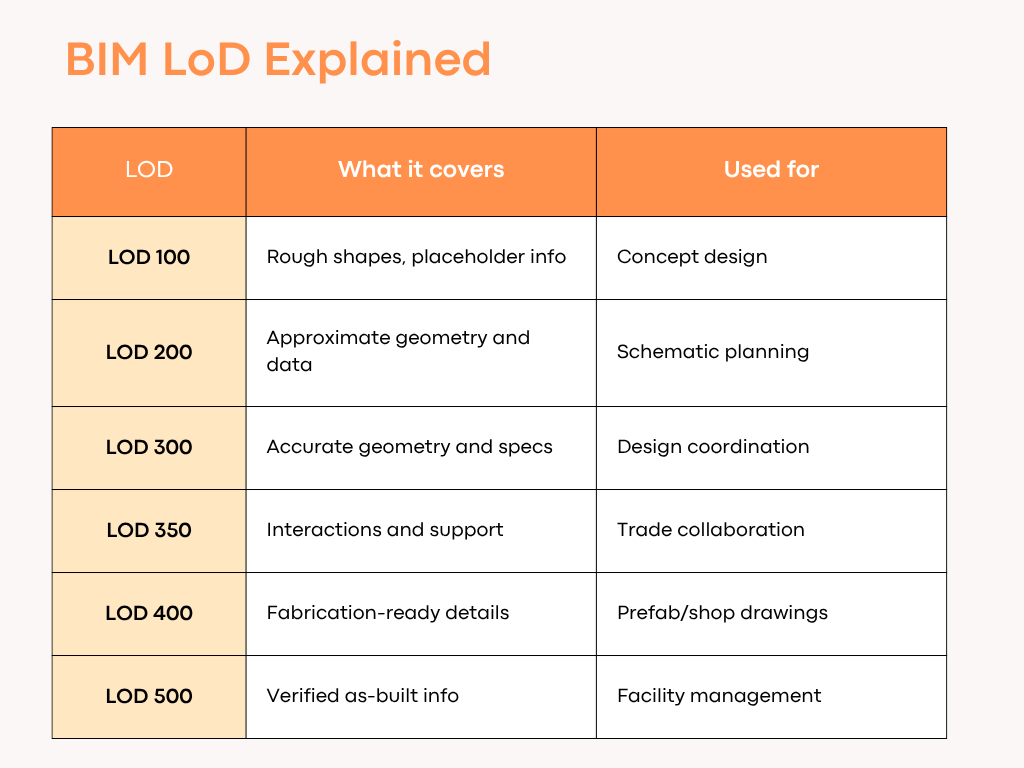
LOD Levels at a Glance:
Wait—LOD or Level of Detail? Aren’t They the Same?
Good catch—but actually, no.
- Level of Detail is just about how much something looks like the real thing visually.
- Level of Development is about how complete and reliable the info is—for decision-making, building, or operations.
So yes, something might look real—but if it’s not trustworthy for fabrication or FM, it’s probably not at the right LOD.
Why LOD Matters (and How It Saves You Money)
Imagine designing a duct system with LOD 200 and trying to install it on-site—that’s how rework happens.
Getting the LOD right means:
- Fewer RFIs
- Less guesswork
- Clearer contracts
- Better collaboration
- More control over cost and quality
It’s not about over-modeling everything—it’s about modeling smart at the right stage.